
Short answer: MERI tracked mowers list a control range of up to 800 m with the standard C7 remote, and up to 1,000 m with the R1 industrial remote. That is a radio figure. The distance you can safely work at is set by what you can see: the machine, the cutting head and the ground ahead. On most banks that means working much closer than the rated figure, with a clear line of sight.
Buyers often ask how far away the operator can stand. The honest answer has two parts. One is the rated range of the radio link. The other is the working distance, which depends on the site. This guide covers both, lists MERI range figures by model, and explains how to choose an operator position on a slope.
Rated range vs working distance
Rated range is how far the radio link can reach in good conditions. It tells you the link has margin. It does not tell you how far you should stand.
Working distance is how far you can be while still seeing what matters. You need to see the mower body, the edge of the cut, and any person, animal or vehicle that might come near. You also need to judge the ground in front of the tracks. Lose any of that and you should move closer, even if the signal is still strong.
MERI control range by model
| Machine | Listed control range | Notes |
|---|---|---|
| ME800 / ME1000 / ME1200 flail models (24 V and 48 V) | Up to 800 m | C7 standard remote |
| ME550-T / ME650-T / ME900-T turf models | Up to 800 m | C7 standard remote |
| Mower models with R1 industrial remote | Up to 1,000 m | Optional upgrade |
| ME-RFM1000-D diesel forestry mulcher | 500 m | Model data sheet |
| ME-RFM1000-E electric forestry mulcher | 200 m | Model data sheet |
| ME-RT PRO multi-function carrier | 400 m | Model data sheet |
Source: MERI product pages and technical data sheets. Confirm the controller fitted to your order in the quotation.
What shortens the signal on a real site
Radio links work best in open, flat country with nothing in the way. Bank sites rarely look like that. These are the common problems:
- Convex slopes. When the mower drops over the brow, both the signal and your view can go. Our guide to visibility on convex slopes covers where to stand.
- Metal structures. Sheds, containers, guardrails and solar frames can block or reflect the signal. See remote mower coverage around metal buildings.
- Dense vegetation and cuttings. Tall wet grass and hedges between you and the machine weaken the link.
- Low transmitter batteries. Weak batteries can cause lag or no response. Replace them before a long job.
How to choose the operator position
- Stand uphill or to the side of the work, never below the mower.
- Pick a spot where you can see the whole strip you are cutting.
- Keep the machine in direct view. Do not drive it behind a hedge, building or brow.
- Move with the work on long banks. Walking along the top is safer than steering from far away.
- Keep a clear exit path for yourself in case the machine slides.
Long road and rail banks are where people are most tempted to stand far off. The highway embankment mowing page shows typical setups that keep the operator close to the work.
Which controller to choose
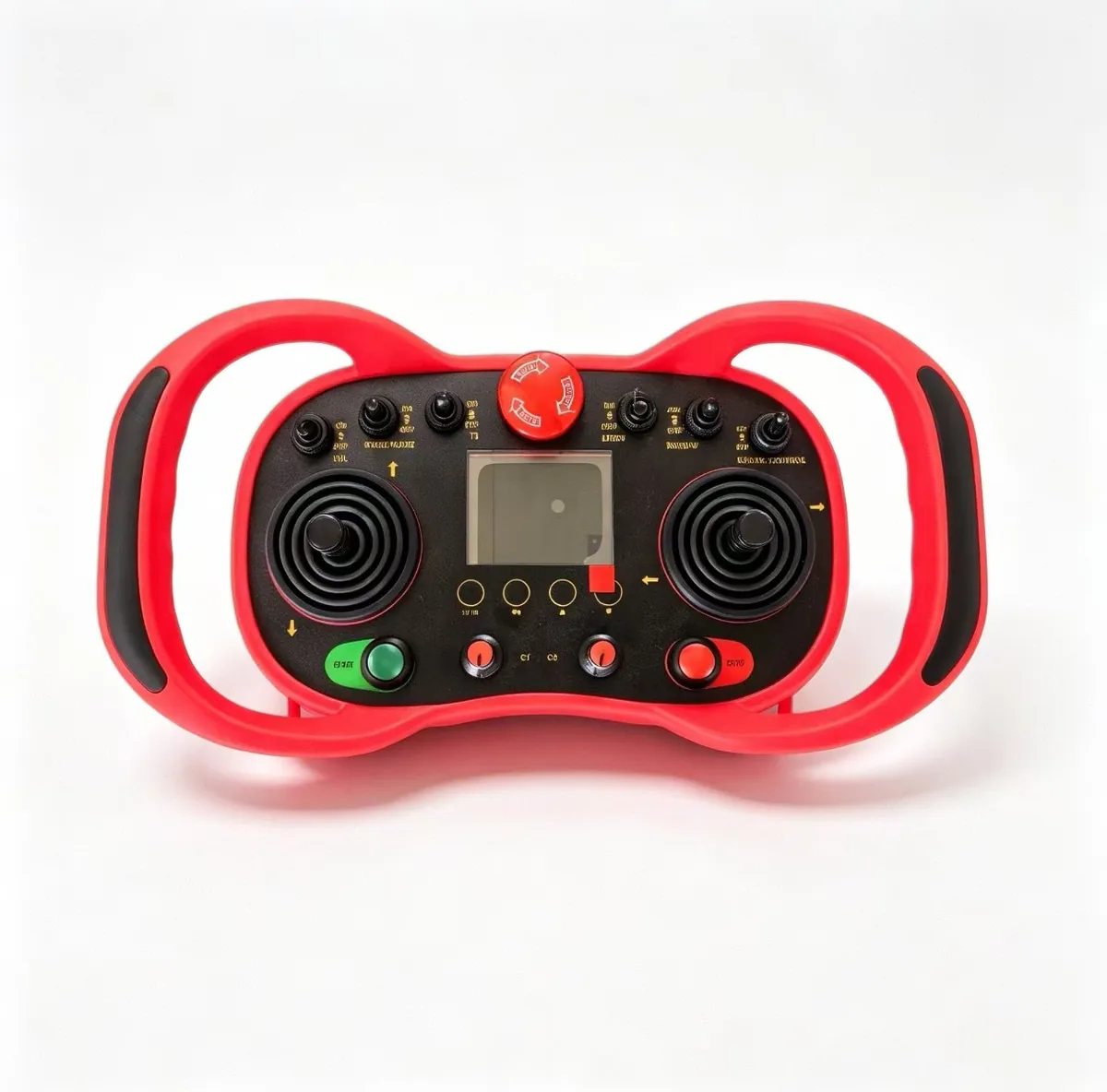
MERI offers three remotes. The C7 is the white standard remote. The R1 is an orange industrial remote. The KBR is a black industrial remote with joysticks and a handle.
Choose the C7 for most mowing work. Consider the R1 when you need more range margin around obstacles or on very long sites. The KBR suits crews who prefer joystick control. Each has its own spare parts. See the C7 controller and receiver page and the KBR controller and receiver page.
Check the link before every job
Most “range” faults are simple. On the C7 receiver, no light means no power to the receiver. A red light means the remote and receiver need pairing again. A green light with no response usually means flat remote batteries. Do not press the LOCK button. It locks the remote and the machine will not respond.
Before work, test the stop on the remote, the stop on the machine, and what happens when you switch the remote off. MERI checks remote start, communication and signal-loss protection on every unit before packing. Repeat those checks on site.
What to send MERI
- A site sketch with the banks and where the operator can stand.
- Longest strip you need to cut in one run.
- Metal structures, hedges or brows on the site.
- Preferred controller type, if any.
- Number of units and destination country.
Compare all models on the MERI remote control mower page.
Frequently asked questions
What is the control range of a MERI remote mower?
MERI tracked mowers list up to 800 m with the standard C7 remote. The R1 industrial remote extends this to up to 1,000 m. Check the data sheet of your exact model, as forestry mulchers and the ME-RT PRO list shorter figures.
Should I work at the full rated range?
No. Rated range is a radio figure. The safe working distance is the one where you can still see the machine, the cutting area and the ground ahead. On most banks that is far shorter than 800 m.
What happens if the mower goes out of range?
Signal-loss protection is on the MERI 13-item pre-delivery checklist. Test it on site at handover by switching off the transmitter while the machine is moving slowly on flat ground.
The receiver light is red. What should I do?
On the C7 receiver, a red light means the remote and receiver need to be paired again. No light means no power to the receiver. Green with no response usually means the remote batteries need replacing.
Match the controller to your site
Send your site layout, bank lengths and where the operator can stand. MERI will suggest a model and controller option and quote for contractor or dealer orders.
Need a mower recommendation for your terrain or project?
Get a Quote